Functionality and technology of capacitive sensors
Capacitive sensors are used in many of the devices and systems people interact with every day, from smartphones and industrial control panels to appliances, vehicles, medical equipment, and building automation systems. Their popularity comes from a simple but powerful principle: they can detect changes in electrical capacitance caused by a nearby object, material, or human touch.
Unlike mechanical switches, capacitive sensors do not need moving parts to register input. This makes them durable, responsive, easy to seal against dust or moisture, and suitable for modern interfaces where smooth surfaces and precise control matter. To understand why capacitive sensors technology is so widely adopted, it helps to look at how capacitance works, how these sensors detect interaction, and where different sensor designs are most useful.
What Is a Capacitive Sensor?
A capacitive sensor is an electronic sensor that detects changes in capacitance. Capacitance is the ability of a system to store an electrical charge. In simple terms, when two conductive surfaces are separated by an insulating material, they form a capacitor. The amount of charge that can be stored depends on factors such as the size of the conductive surfaces, the distance between them, and the material between them.
In a capacitive sensor, one conductive element is built into the device. When a finger, conductive object, liquid, or certain material comes close to the sensor area, it changes the electric field around that element. The sensor's electronics measure this change and interpret it as a touch, presence, position, level, or movement.
This ability to sense without direct mechanical pressure is one of the main advantages of capacitive touch technology. A user can trigger a button through glass, plastic, or another non-conductive overlay, making capacitive designs ideal for sealed and hygienic surfaces.
How Capacitive Sensors Work
The basic function of a capacitive sensor depends on an electric field. The sensor creates a small field around an electrode. When no object is nearby, the capacitance remains at a baseline level. When an object enters the field, the capacitance changes. The electronics inside the sensor detect that variation and convert it into a signal.
In touch applications, the human body acts as a conductive object. Because the body contains water and electrolytes, it can influence the electric field around the sensor. When a finger approaches or touches the surface, the sensor detects the resulting capacitance change and registers an input.
A typical capacitive sensing system includes:
Electrodes: Conductive areas that form the sensing zone.
Dielectric layer: A non-conductive material such as glass, plastic, ceramic, or air.
Controller electronics: Circuits that generate signals, measure capacitance changes, and process input.
Firmware or software: Logic that filters noise, defines thresholds, and interprets gestures or sensor states.
User interface or output system: The part of the device that responds, such as a screen, relay, display, or control unit.
The sensitivity of the sensor depends on the size and shape of the electrode, the overlay material, environmental conditions, and the quality of the control electronics.
Main Types of Capacitive Sensors
Capacitive sensors can be designed in several ways depending on the application. The two most common categories are self-capacitance and mutual capacitance.
Self-Capacitance Sensors
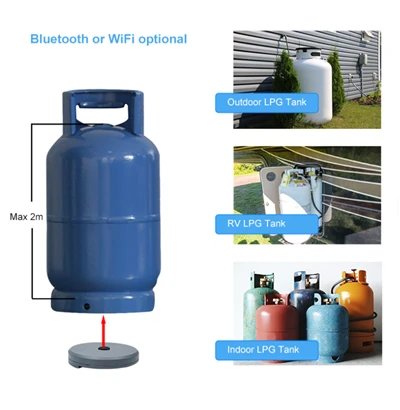
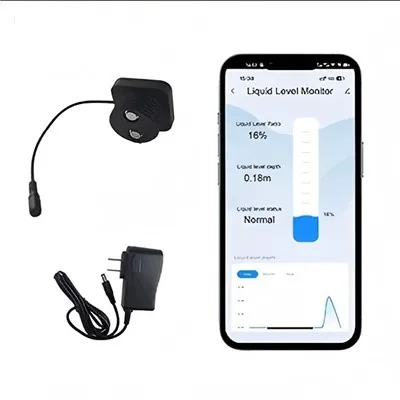
A self-capacitance sensor measures the capacitance between a single electrode and ground. When a finger or object approaches the electrode, the capacitance increases. This type of sensor is common in simple touch buttons, sliders, proximity sensors, and liquid level detection systems.
Self-capacitance sensors are relatively straightforward and sensitive, making them useful when the system only needs to detect whether something is present or not. However, they can be less effective for advanced multi-touch applications because multiple simultaneous touches may be harder to identify accurately.
Mutual Capacitance Sensors
Mutual capacitance sensors use a grid of transmitting and receiving electrodes. Capacitance is measured at the intersections of the grid. When a finger touches the surface, it changes the coupling between electrodes at a specific locati0n. This allows the system to determine precise touch coordinates.
This design is widely used in capacitive touchscreens because it supports multi-touch gestures, such as pinch-to-zoom, swiping, rotating, and two-finger scrolling. Mutual capacitance enables fast, accurate, and intuitive interaction with smartphones, tablets, kiosks, and modern control displays.
Capacitive Touchscreens and User Interfaces
Capacitive touchscreens are one of the most familiar examples of capacitive sensing. They typically include a transparent conductive layer beneath a protective glass surface. When a user touches the screen, the controller detects the change in capacitance and calculates the touch position.
Compared with older resistive touchscreens, capacitive touchscreens usually offer better clarity, faster response, and support for multiple touch points. They do not require pressure to operate, so the user experience feels smoother and more natural. This is why capacitive touch technology has become standard in many consumer electronics and professional interfaces.
However, capacitive touchscreens also require careful design. The controller must distinguish intentional touches from electrical noise, moisture, accidental contact, gloves, and other environmental effects. High-quality systems use signal filtering, calibration, shielding, and firmware algorithms to improve reliability.
Key Components of Capacitive Sensors Technology
A successful capacitive sensing design depends on more than the electrode alone. Several technical elements affect performance.
Electrode Design
The electrode is the active sensing area. Its size, shape, thickness, and placement determine sensitivity and detection range. Larger electrodes can detect objects farther away, but they may also be more vulnerable to noise or unintended activation. Smaller electrodes can provide more precise sensing but may require closer contact.
Overlay Material
The overlay is the surface between the user and the electrode. Glass and plastic are common because they are electrically insulating and can protect the sensor from wear, chemicals, moisture, and impact. The thickness and dielectric properties of the overlay affect how easily the sensor detects changes in capacitance.
Controller Circuitry
The controller measures small capacitance changes and converts them into usable information. In advanced designs, it also handles calibration, touch tracking, gesture recognition, and noise rejection. The controller must be chosen according to the number of sensing channels, required speed, environmental conditions, and interface complexity.
Shielding and Grounding
Capacitive sensors can be affected by electrical interference from nearby circuits, motors, displays, power supplies, or cables. Proper grounding, shielding, and PCB layout help reduce unwanted signals. In industrial or automotive environments, this is especially important because electrical noise can be significant.
Software Filtering
Firmware plays a major role in sensor behavior. It can set touch thresholds, compensate for slow environmental changes, reject false triggers, and adapt to different use conditions. Good software tuning can make the difference between a sensor that feels unreliable and one that feels smooth and precise.
Common Applications of Capacitive Sensors
Capacitive sensors are used across many industries because they can detect touch, proximity, position, and material presence with minimal mechanical wear.
Common applications include:
Consumer electronics: Smartphones, tablets, laptops, earbuds, remote controls, and wearable devices.
Home appliances: Touch panels on ovens, washing machines, refrigerators, coffee machines, and induction cooktops.
Automotive systems: Infotainment displays, steering wheel controls, door handles, seat occupancy detection, and interior lighting controls.
Industrial automation: Level sensing, object detection, operator panels, machine controls, and sealed switches.
Medical devices: Hygienic control surfaces, monitoring equipment, diagnostic devices, and touch-operated interfaces.
Building systems: Access control panels, elevators, lighting controls, thermostats, and smart home devices.
Because capacitive sensors can operate behind a sealed surface, they are especially useful where cleanliness, durability, or weather resistance is important.
Benefits of Capacitive Touch Technology
Capacitive touch technology offers several practical advantages over traditional mechanical input methods.
First, it improves durability. Since there are no moving parts, there is less mechanical wear over time. This is valuable in devices that are used frequently or exposed to demanding environments.
Second, it supports sleek product design. Controls can be placed behind glass or plastic, creating a smooth surface that is easy to clean and visually modern.
Third, capacitive sensing can be highly responsive. A well-designed sensor detects light touch quickly and accurately, improving the user experience.
Fourth, it enables advanced interaction. In touchscreen systems, capacitive sensing supports gestures and multi-touch input that mechanical buttons cannot provide.
Finally, capacitive sensors can improve sealing and hygiene. Because the sensing element does not need an opening in the enclosure, products can be designed to resist moisture, dust, chemicals, and contaminants.
Design Challenges and Limitations
Although capacitive sensors are versatile, they are not ideal for every situation. Environmental and design factors can affect performance.
Moisture is one common challenge. Water droplets can alter capacitance and may cause false touches if the system is not properly tuned. Electrical noise can also interfere with readings, especially in industrial environments. Thick overlays may reduce sensitivity, while poor grounding can lead to unstable behavior.
Glove operation is another consideration. Standard capacitive touchscreens may not respond well to thick or non-conductive gloves unless they are specifically designed for glove support. Designers may need to increase sensitivity, use specialized algorithms, or choose a different sensing approach.
Temperature changes, humidity, nearby metal parts, and user behavior can also influence readings. For this reason, reliable capacitive sensors technology requires careful mechanical, electrical, and software design rather than simply adding an electrode to a product.
Best Practices for Reliable Capacitive Sensor Design
To achieve consistent performance, designers should consider the complete sensing environment.
Important best practices include:
Use an electrode size and shape that matches the intended sensing distance.
Choose overlay materials with suitable thickness and dielectric properties.
Keep sensor traces short where possible to reduce noise pickup.
Use proper grounding and shielding around sensitive circuits.
Separate sensor areas from high-voltage or high-current components.
Tune firmware thresholds for real-world conditions, not only laboratory tests.
Test with moisture, gloves, temperature variation, and expected contaminants.
Plan for automatic calibration to compensate for gradual environmental changes.
Avoid placing metal parts too close to the sensing area unless they are part of the design.
These steps help ensure that the sensor responds to intentional input while ignoring accidental or environmental changes.
The Future of Capacitive Sensing
As devices become more compact, connected, and interface-driven, capacitive sensing continues to evolve. Modern systems are becoming more sensitive, more energy efficient, and better at recognizing complex interactions. Capacitive sensors are increasingly combined with haptic feedback, proximity detection, force estimation, and gesture control to create richer user experiences.
In industrial and automotive applications, robust capacitive interfaces are helping replace traditional switches while maintaining reliability in demanding environments. In consumer products, capacitive touchscreens and hidden touch controls continue to support cleaner designs and more intuitive operation.
The core principle remains simple: detect a change in capacitance and turn it into useful information. But the technology around that principle has become highly advanced, allowing capacitive sensors to support everything from a single touch button to a sophisticated multi-touch display.
Conclusion
Capacitive sensors work by measuring changes in an electric field caused by a nearby object, material, or human touch. This makes them ideal for touch controls, proximity sensing, liquid level detection, and interactive displays. From simple buttons to advanced capacitive touchscreens, the technology provides durability, responsiveness, and design flexibility.
Understanding the fundamentals of capacitive sensors technology helps explain why it has become so common in modern products. When electrode design, materials, controller electronics, shielding, and software are carefully balanced, capacitive touch technology can deliver reliable and intuitive interaction across a wide range of applications.