How to Use U S Solid Wi-Fi Smart Ball Valve
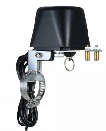
A U.S. Solid Wi‑Fi smart ball valve turns an ordinary shutoff into an automated ball valve you can open/close from your phone, schedule by time, or trigger from sensors-ideal for irrigation, water heaters, RV lines, or emergency shutoff. This practical smart ball valve installation guide walks you through How to Use U.S. Solid Wi‑Fi Smart Ball Valve safely, from planning and mounting to app pairing, calibration, automation, and troubleshooting.
What You Need Before You Start
Before you begin your U.S. Solid WiFi ball valve setup, confirm the basics:
Correct valve size & type: Match pipe diameter (e.g., 1/2", 3/4", 1") and thread type (NPT vs BSP).
Power source available: Verify smart ball valve power supply requirements (typically DC adapter). Avoid undersized adapters that cause stalls.
Wi‑Fi network details: You'll need the SSID/password and access to the router settings (especially if using 2.4 GHz only).
A backup plan: Know the smart valve manual override operation method (lever/handle or disengage clutch, depending on model).
If you're deciding between ecosystems, note the common tradeoff: Zigbee vs WiFi ball valve-Wi‑Fi is simple (no hub), while Zigbee often offers more reliable mesh coverage and lower power draw (but requires a hub).
Step 1: Choose the Best Installation Location
Pick a spot that's accessible and protected.
Best practices
Install on the main shutoff or the dedicated line you want to control (irrigation zone, humidifier feed, etc.).
Keep the actuator away from splash zones and freezing areas.
Leave space above/around the valve so the actuator can rotate without obstruction.
Tip: If your project is leak-prevention, consider whether you also want flow/leak sensors. If you don't, look at best smart water shutoff valve alternatives that bundle sensors and automatic shutoff logic.
Step 2: Smart Ball Valve Installation (Plumbing)
For a threaded valve:
Turn off water and relieve pressure (open a faucet downstream).
Remove the old valve (if replacing).
Apply thread sealant (PTFE tape or pipe dope rated for potable water).
Thread in the valve, aligning the flow direction if marked.
Tighten without over-torquing (avoid stressing fittings).
For a more complex setup, follow your product's U.S. Solid smart valve wiring diagram and mounting instructions if the actuator is separate from the valve body.
Safety note: If you're not comfortable working on a main line, hire a plumber-especially for indoor main shutoffs where a mistake can flood quickly.
Step 3: Wire/Power the Valve Correctly
Most connection failures and weak performance come from power issues.
Confirm voltage and polarity if using DC barrel connectors or terminals.
Use a stable outlet; avoid flaky smart plugs for the valve's primary power.
Route cables so they don't snag the actuator.
If your model supports dry-contact input or external control, use the manufacturer's U.S. Solid smart valve wiring diagram to connect controllers, relays, or safety interlocks.
Step 4: App Setup and Pairing (Wi‑Fi)
This is the core of WiFi water shutoff valve app pairing.
Put the valve into pairing mode (often a long-press on the button).
On your phone, connect to the temporary device hotspot if prompted.
In the app, select your home Wi‑Fi and enter the password.
Wait for confirmation and name the device (e.g., "Main Water Shutoff").
How to Connect Smart Valve to Router (When It Won't Pair)
If you're stuck on how to connect smart valve to router, check these in order:
Use 2.4 GHz Wi‑Fi (many Wi‑Fi valves don't support 5 GHz).
Disable "AP isolation," "client isolation," or overly strict firewall rules.
Keep the phone and valve close to the router during setup.
If your SSID combines 2.4/5 GHz, try temporarily splitting SSIDs.
Avoid special characters in SSID/password if pairing repeatedly fails.
This covers the most common reasons behind why smart ball valve not connecting.
Step 5: Basic Operation as a Remote Control Valve
Once paired, your valve becomes a remote control valve:
Tap Open to allow flow.
Tap Close to shut off flow.
Use the status indicator (open/closed) and refresh if the app caches state.
Actionable tip: Do a "daily reality check" the first week: open/close once per day to confirm smooth movement before relying on it for emergencies.
Step 6: WiFi Valve Calibration and Testing
Many users skip this and later think the valve is broken. Do WiFi valve calibration and testing right after install:
Run at least 5 full open/close cycles.
Listen for grinding/clicking (can indicate misalignment or low power).
Confirm the valve reaches fully closed (no downstream flow).
Check for actuator strain at endpoints-some valves allow endpoint calibration in-app.
If your valve offers torque settings or travel calibration, set it so the motor stops reliably without overdriving.
Step 7: Automations, Scenes, and Schedules
A smart valve is most useful when it runs automatically. Use smart valve automation scenes schedules like:
Irrigation window: Open at 6:00 AM, close at 6:30 AM.
Vacation mode: Close main line when everyone leaves geofence.
Water heater safety: Close supply at night or when away.
Emergency shutoff: Close when a leak sensor triggers (if supported).
For voice assistants, configure smart ball valve Alexa Google Home integration so you can say "Turn off the water," but protect it with:
Voice PIN/secure actions (if available)
Conservative naming (avoid accidental triggers like "valve" vs "water")
Step 8: Home Assistant and Advanced Control
If you're building a smarter home, verify smart ball valve compatibility with Home Assistant. Common approaches include:
Native integration via the brand's cloud (simpler, depends on internet uptime)
Local control if the device supports it (better reliability)
Automation rules: close valve if flow stays high for X minutes, or if "Away" mode is enabled
Manual Override: What to Do When Power or Wi‑Fi Is Down
Know your smart valve manual override operation steps before an emergency:
If there's a physical lever, practice switching it.
If the actuator has a clutch/release, learn how to disengage and turn the valve by hand.
Keep the area clear so you can reach it quickly.
Troubleshooting Quick Fixes
Troubleshoot Smart Valve Leaking
If you need to troubleshoot smart valve leaking:
Verify the valve body is installed in the correct direction (if directional).
Recheck thread sealant and torque on fittings.
Confirm the valve fully closes (re-run calibration/testing).
Inspect for debris lodged in the ball seat (may require disassembly/replacement).
Why Smart Ball Valve Not Connecting (After It Worked)
Router firmware update changed settings
Device got moved to weak signal area
DHCP issues (try reserving an IP in the router)
App permissions/background restrictions on the phone
Takeaway
With correct plumbing, proper power, careful WiFi water shutoff valve app pairing, and thorough WiFi valve calibration and testing, the u s solid wi-fi smart ball valve becomes a dependable remote control valve for everyday convenience and real risk reduction. Treat setup like a safety device: test it, automate it thoughtfully, and keep manual override access clear so you're covered even when Wi‑Fi isn't.
Estimated word count (body): ~970 words.