MyPropane | Propane Tank Monitor: Complete Review and User Guide
Everything You Need to Know About MyPropane Smart Propane Monitoring System
Introduction: What Is MyPropane?
MyPropane is a smart propane tank monitoring system that allows homeowners and property managers to remotely track their propane fuel levels using a smartphone app or web portal. The MyPropane propane tank monitor connects to your existing propane tank and transmits real-time fuel level data, helping you avoid run-outs, plan refills, and manage your propane usage more effectively.
In this comprehensive review, we'll cover:
What MyPropane is and how it works
Key features and benefits
MyPropane app functionality
Installation process
Pricing and subscription costs
Pros and cons
Comparison with competitors
User reviews and ratings
Frequently asked questions
By the end of this guide, you'll have all the information needed to decide if MyPropane is the right propane monitoring solution for your needs.
MyPropane Overview
What Is the MyPropane Propane Tank Monitor?
The MyPropane propane tank monitor is a wireless device that attaches to your propane tank's existing float gauge. It uses ultrasonic or magnetic sensor technology to measure fuel levels and transmits this data via cellular or WiFi connectivity to the MyPropane cloud platform, accessible through the MyPropane app.
Who Makes MyPropane?
MyPropane is developed and marketed by various propane suppliers and technology companies that offer smart monitoring solutions under the MyPropane brand. The specific manufacturer may vary by region and supplier, but the core functionality remains consistent across implementations.
What Tanks Does MyPropane Work With?
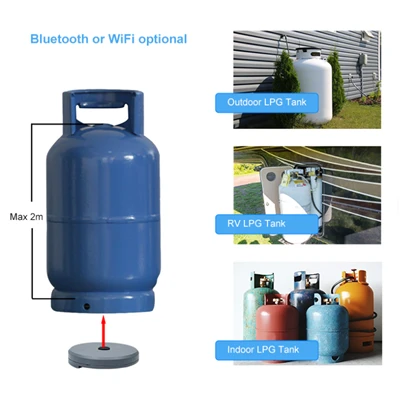
MyPropane monitors are compatible with:
Above-ground propane tanks: 120 gallon to 1,000+ gallon
Underground propane tanks: 250 gallon to 1,000+ gallon
RV propane tanks: With appropriate adapter
Standard float gauges: Works with most residential tank gauges
Compatibility Requirements:
Tank must have a standard float gauge (R3D, Rochester, or similar)
For underground tanks: Specific MyPropane models designed for burial
For cellular models: Cellular coverage at tank location
For WiFi models: WiFi signal strength at tank location
How MyPropane Works
The Monitoring Process
Step 1: Installation
MyPropane sensor attaches to your tank's existing float gauge
Magnetic or adhesive mounting options available
Professional installation available from participating propane suppliers
Step 2: Data Transmission
Sensor measures propane level (typically via float gauge connection)
Data transmitted via cellular network or WiFi to MyPropane servers
Updates typically sent every 1-24 hours (configurable)
Step 3: Access Your Data
Open MyPropane app on smartphone
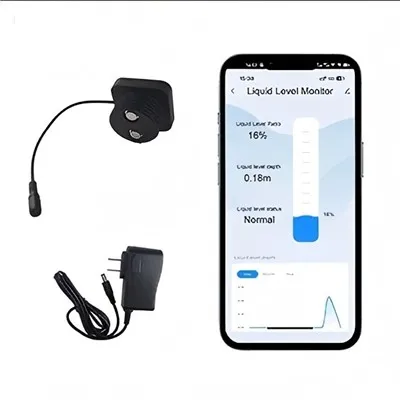
View current propane level (percentage and gallons)
Check historical usage data
Receive low-fuel alerts
Step 4: Manage Deliveries
Schedule propane deliveries through the app
Automatic delivery integration with participating suppliers
Request emergency deliveries if needed
MyPropane Connectivity Options
MyPropane monitors typically offer two connectivity options:
1. Cellular MyPropane Monitor
Uses 4G LTE cellular network
Works anywhere with cellular coverage
No WiFi required
Typically includes monthly subscription fee ($5-10/month)
Best for remote locations or properties without WiFi at tank
2. WiFi MyPropane Monitor
Connects to your home WiFi network
No monthly fees (typically)
Requires WiFi coverage at tank location
Best for homes with strong WiFi signal reaching the tank
MyPropane Key Features
1. Real-Time Propane Level Monitoring
What You See:
Current propane level (percentage)
Estimated gallons remaining
Days until empty (based on usage patterns)
Last reading timestamp
Accuracy: Typically ±5-10% depending on model and installation
Update Frequency:
Standard: Every 6-24 hours
Premium: Every 1-6 hours
On-demand: Manual refresh available
2. Low-Fuel Alerts
Alert Options:
Push notifications to smartphone
Email alerts to registered email address
SMS/text messages (with some plans)
Customizable thresholds: Set alerts at 30%, 20%, or any level you choose
Example Alert Settings:
| Alert Level | When It Triggers | Recommended Action |
|---|---|---|
| Warning (30%) | Tank reaches 30% capacity | Plan delivery soon |
| Critical (20%) | Tank reaches 20% capacity | Schedule delivery now |
| Urgent (10%) | Tank reaches 10% capacity | Order emergency delivery |
3. Usage Tracking and History
Historical Data Available:
Daily propane usage (gallons per day)
Weekly and monthly usage trends
Seasonal usage patterns
Year-over-year comparisons
Benefits:
Identify usage spikes
Budget for propane costs
Detect potential leaks (unusual usage)
Optimize delivery timing
4. Delivery Management
For Participating Propane Suppliers:
Automatic delivery: Supplier monitors your tank and delivers when needed
One-click ordering: Request delivery directly through app
Delivery scheduling: Choose preferred delivery dates
Price tracking: Monitor propane prices over time
Note: Delivery management features require account with participating propane supplier
5. Multi-Tank Support
For Properties with Multiple Propane Tanks:
Monitor multiple tanks from single app
Assign names to tanks (e.g., "Main House", "Guest House", "Generator")
View all tanks on single dashboard
Set individual alert thresholds per tank
6. Weather Integration
Smart Features:
Local weather data integration
Cold weather usage predictions
Heating degree day tracking
Proactive delivery recommendations based on forecast
7. Family and User Sharing
Multi-User Access:
Share tank monitoring access with family members
Multiple users can view data and receive alerts
Property manager access for rental properties
User permission levels (admin, viewer, etc.)
MyPropane App: Features and Interface
App Availability
iOS: Available on iPhone and iPad (iOS 12.0 or later)
Android: Available on Android phones and tablets (Android 6.0 or later)
Web Portal: Accessible from any web browser
App Dashboard
Main Screen Shows:
Current tank level (large percentage display)
Estimated gallons remaining
Days until empty prediction
Last reading time
Current weather conditions
Quick actions (order propane, refresh, settings)
App Navigation
Typical MyPropane App Sections:
| Section | What You'll Find |
|---|---|
| Dashboard | Current level, alerts, quick actions |
| History | Usage graphs, daily/weekly/monthly data |
| Deliveries | Past deliveries, upcoming scheduled deliveries |
| Settings | Alert thresholds, notifications, account info |
| Support | Help documentation, contact support |
App Ratings
Typical App Store Ratings (varies by specific MyPropane implementation):
iOS App Store: 3.5-4.5 stars (varies by version and region)
Google Play: 3.0-4.0 stars
Common Praise: Easy to use, helpful alerts, peace of mind
Common Complaints: Occasional connectivity issues, update frequency
MyPropane Installation Guide
Professional Installation (Recommended)
Many propane suppliers offer professional installation as part of MyPropane service:
What's Included:
Technician visits your property
Installs sensor on tank gauge
Configures cellular or WiFi connection
Sets up app account
Tests system functionality
Demonstrates app features
Time Required: 30-60 minutes
Cost:
Often free with supplier subscription
Standalone installation: $50-100
DIY Installation
If installing MyPropane yourself:
Time Required: 20-45 minutes
Tools Needed:
MyPropane sensor unit
Smartphone with MyPropane app
Basic tools (varies by model: screwdriver, wrench)
Ladder (if tank is elevated)
Step-by-Step Installation:
Step 1: Prepare the Tank
Locate your propane tank's float gauge (usually on top)
Clean the gauge area if dirty
Ensure gauge is accessible and in good condition
Step 2: Install the Sensor
For magnetic mount: Place sensor on gauge
For clamp mount: Secure sensor around gauge
Ensure sensor is properly aligned with gauge needle
Verify secure attachment
Step 3: Power On
Insert batteries (if applicable)
Or connect to power source (some models)
Wait for sensor to initialize (typically 1-2 minutes)
Step 4: Download and Open MyPropane App
Download MyPropane app from App Store or Google Play
Create account (email, password)
Follow in-app setup instructions
Step 5: Pair Sensor with App
In app, select "Add New Tank" or "Pair Sensor"
Enter sensor ID (found on sensor or packaging)
App will search for and connect to sensor
Step 6: Configure WiFi or Cellular
WiFi models: Select your WiFi network and enter password
Cellular models: Follow activation instructions (may require calling provider)
Step 7: Enter Tank Information
Tank size (gallons)
Tank location (above-ground, underground)
Tank name (if multiple tanks)
Step 8: Set Alert Thresholds
Warning level (recommend 30%)
Critical level (recommend 20%)
Urgent level (recommend 10%)
Step 9: Test the System
Verify reading matches tank gauge
Send test alert to confirm notifications work
Check historical data appears in app
Installation Tips
Best signal strength: Mount sensor where it has clear path to WiFi router or cellular coverage
Weather protection: Ensure sensor is rated for outdoor use in your climate
Regular maintenance: Check batteries annually, clean sensor contacts
Underground tanks: Professional installation recommended for proper burial-rated sensor placement
MyPropane Pricing and Subscription Costs
MyPropane Monitor Cost
| Model | Price Range | Notes |
|---|---|---|
| WiFi MyPropane | $100-150 | No monthly fees typically |
| Cellular MyPropane | $150-200 | Plus monthly subscription |
| Professional installation | $0-100 | Often included with supplier service |
MyPropane Subscription Plans
Cellular Plan Pricing (varies by provider):
| Plan | Monthly Cost | Features |
|---|---|---|
| Basic Cellular | $5-8/month | Daily updates, low-fuel alerts |
| Standard Cellular | $8-12/month | Every 6-hour updates, usage tracking |
| Premium Cellular | $12-15/month | Hourly updates, all features, priority support |
WiFi Plans:
Most WiFi models: No monthly fee
Some premium features may require subscription ($3-5/month optional)
Total Cost of Ownership
WiFi MyPropane (3 years):
Device: $100-150
Monthly fees: $0
Battery replacement: $10-20 (every 2-3 years)
Total: $110-170
Cellular MyPropane (3 years):
Device: $150-200
Monthly fees: $180-540 (depending on plan)
Battery replacement: $10-20
Total: $340-760
Supplier Bundled Pricing
Many propane suppliers offer MyPropane as part of automatic delivery service:
Typical Bundled Offer:
Free or discounted MyPropane monitor ($0-50)
Monthly monitoring fee included in delivery price
Automatic delivery when tank reaches 20-30%
Contract may be required (1-3 years)
MyPropane Pros and Cons
✅ Pros
| Advantage | Details |
|---|---|
| Remote Monitoring | Check propane level from anywhere via smartphone |
| Prevent Run-Outs | Low-fuel alerts help avoid running out of propane |
| Usage Insights | Track consumption patterns and trends |
| Delivery Integration | Easy propane ordering with participating suppliers |
| Multiple Tanks | Monitor several tanks from one app |
| Family Sharing | Share access with household members |
| Weather Awareness | Predict usage based on weather forecasts |
| Peace of Mind | Know your fuel level at all times |
| Save Money | Avoid emergency delivery fees |
| Easy Installation | Most users can install in under an hour |
❌ Cons
| Disadvantage | Details |
|---|---|
| Monthly Fees | Cellular plans require ongoing subscription ($5-15/month) |
| Accuracy Limitations | ±5-10% accuracy, not as precise as weight measurement |
| Connectivity Requirements | Needs WiFi or cellular coverage at tank location |
| Compatibility Limits | Requires standard float gauge; may not work with all tanks |
| App Dependencies | Requires smartphone and app to access data |
| Battery Maintenance | Batteries need replacement every 2-5 years |
| Supplier Lock-In | Full features may require specific propane supplier |
| Update Frequency | Some plans only update daily (not real-time) |
| Initial Cost | $100-200 upfront investment |
| Underground Tank Challenges | May require professional installation for buried tanks |
MyPropane vs. Competitors
Comparison with Top Propane Monitors
| Feature | MyPropane | Generac 4G LTE | Mopeka Pro Check | Tank Utility |
|---|---|---|---|---|
| Price | $100-200 | $199-249 | $65-73 | $150-200 |
| Monthly Fee | $5-15 (cellular) | ✅ None | None | None |
| Connection | Cellular/WiFi | Cellular | Bluetooth/WiFi | WiFi |
| Accuracy | ±5-10% | ±3% | ±5% | ±5% |
| Remote Access | ✅ Yes | ✅ Yes | WiFi: Yes / BT: No | ✅ Yes |
| App Rating | 3.5-4.0★ | 4.0-4.5★ | 4.5★ | 4.0★ |
| Delivery Integration | ✅ Yes (suppliers) | Limited | No | Limited |
| Multiple Tanks | ✅ Yes | ✅ Yes | ✅ Yes | ✅ Yes |
| Best For | Supplier integration | No monthly fees | Budget buyers | Underground tanks |
When to Choose MyPropane
Choose MyPropane if:
✅ Your propane supplier offers MyPropane integration
✅ You want automatic delivery coordination
✅ You have multiple tanks to monitor
✅ You want usage tracking and history
✅ You're comfortable with monthly subscription (cellular model)
When to Choose Competitors
Choose Generac 4G LTE if:
✅ You want cellular monitoring with NO monthly fees
✅ You have a backup generator
✅ You want best-in-class accuracy (±3%)
Choose Mopeka Pro Check if:
✅ You're on a tight budget ($65-73)
✅ You have an RV or small tank
✅ You want Bluetooth for local checking (no monthly fees)
Choose Tank Utility if:
✅ You have an underground tank
✅ You have WiFi at tank location
✅ You want simple WiFi monitoring without monthly fees
MyPropane User Reviews
What Users Say
Positive Reviews:
"MyPropane has saved me from running out of propane twice already. The alerts are reliable, and I love being able to check my tank level from my phone." - Sarah M., Homeowner
"Integration with my propane supplier is seamless. They automatically deliver when I'm at 25%, and I never have to worry about it." - John D., Property Manager
"The usage tracking feature helped me identify a leak in my system that was wasting propane. The monitor paid for itself in one month!" - Mike R., Homeowner
Critical Reviews:
"The cellular plan is expensive at $12/month. I wish they offered a less expensive option with fewer features." - David K., Homeowner
"Updates only come once per day on the basic plan, which isn't frequent enough for winter monitoring." - Lisa T., Homeowner
"The app crashes occasionally, especially when trying to view historical data." - Tom B., Homeowner
Common Praise
Prevents run-outs
Easy installation
Good alert system
Supplier integration
Common Complaints
Monthly subscription cost
App stability issues
Update frequency limitations
Accuracy could be better
MyPropane Setup and Configuration
Optimal Alert Settings
Recommended Configuration:
| Alert Type | Threshold | Notification Method |
|---|---|---|
| Warning | 30% | Push notification + Email |
| Critical | 20% | Push + Email + SMS (if available) |
| Urgent | 10% | All notification methods |
Best Practices for Using MyPropane
Check the app weekly during normal usage
Check daily during heavy use (cold winter months)
Order propane at 25-30% to allow time for delivery
Review usage history monthly to identify trends
Test alerts quarterly to ensure notifications work
Replace batteries proactively (every 2-3 years for most models)
Keep app updated for best performance and features
Troubleshooting Common MyPropane Issues
Issue 1: MyPropane Sensor Not Connecting
Symptoms:
App shows "Offline" or "No Signal"
Last reading is old (24+ hours)
Cannot refresh data
Solutions:
Check sensor batteries (replace if low)
Verify WiFi/cellular signal at tank location
Restart the sensor (remove and reinsert batteries)
Move closer to router (WiFi models)
Check for cellular outage in your area (cellular models)
Contact MyPropane support if issue persists
Issue 2: Inaccurate Readings
Symptoms:
App shows different level than tank gauge
Reading seems wrong
Solutions:
Verify sensor is properly attached to gauge
Check that gauge needle moves freely
Compare with manual gauge reading
Recalibrate sensor in app (if feature available)
Wait 24 hours for next reading
Contact support if accuracy issue persists
Issue 3: Not Receiving Alerts
Symptoms:
Tank reached threshold but no alert received
Missed notifications
Solutions:
Check notification settings in app (ensure enabled)
Check phone notification permissions
Verify alert thresholds are set correctly
Test alert by temporarily lowering threshold
Check spam/junk folder for email alerts
Ensure phone is not in Do Not Disturb mode
Issue 4: App Crashes or Won't Load
Symptoms:
App closes unexpectedly
Won't open or freezes
Solutions:
Update app to latest version
Restart your phone
Clear app cache (Android) or reinstall app (iOS)
Check for phone software updates
Contact support if issue persists
MyPropane Support and Resources
Getting Help
Support Options:
In-app help: Documentation and FAQ within app
Website support: Help center at provider's website
Phone support: Varies by provider (typically business hours)
Email support: Response within 24-48 hours typically
Your propane supplier: Often the first point of contact for MyPropane issues
Documentation
Available Resources:
User manual (PDF download)
Installation guide
Video tutorials
FAQ section
Troubleshooting guides
Frequently Asked Questions (FAQ)
Q1: Is MyPropane worth it?
A: For most propane users, yes. MyPropane pays for itself by preventing just one emergency delivery (saving $50-150 in fees). The convenience, peace of mind, and usage insights provide additional value. However, if you're on a tight budget and have reliable WiFi at your tank, competitors like Mopeka Pro Check offer similar functionality for less.
Q2: Does MyPropane require a subscription?
A: It depends on the model. WiFi MyPropane monitors typically have no monthly fee. Cellular MyPropane monitors require a monthly subscription ($5-15/month) to cover cellular data costs. Some propane suppliers include MyPropane monitoring as part of automatic delivery service.
Q3: How accurate is MyPropane?
A: MyPropane is typically accurate to ±5-10%, similar to most smart propane monitors. It measures based on your tank's float gauge, so accuracy depends partly on gauge condition. For more precise measurement, the weight method is most accurate (±2%).
Q4: Can I install MyPropane myself?
A: Yes, most users can install MyPropane in 20-45 minutes with basic tools. However, professional installation is recommended for underground tanks or if you're uncomfortable working with propane equipment. Many suppliers offer free or low-cost professional installation.
Q5: Does MyPropane work with underground tanks?
A: Yes, MyPropane offers models specifically designed for underground tanks. These have weatherproof and burial-rated sensors. Professional installation is recommended for underground tanks.
Q6: How often does MyPropane update?
A: Update frequency depends on your plan:
Basic plan: Every 24 hours
Standard plan: Every 6 hours
Premium plan: Every hour
On-demand: Manual refresh available on all plans
Q7: What happens if MyPropane loses connection?
A: The sensor will continue to collect data locally. When connection is restored, it will upload all stored readings. You won't receive alerts during the outage, so it's important to address connectivity issues promptly.
Q8: Can I use MyPropane with any propane supplier?
A: The basic monitoring features work with any propane supplier. However, delivery integration features (automatic delivery, one-click ordering) only work with participating propane suppliers. Check with your supplier to see if they support MyPropane.
Q9: How long do MyPropane batteries last?
A: Battery life varies by model and usage:
Typical range: 2-5 years
Factors affecting battery life: Update frequency, temperature, signal strength
Battery type: Usually AA or lithium (user-replaceable)
Q10: Can multiple people access MyPropane?
A: Yes. You can share MyPropane access with family members, property managers, or anyone else who needs to monitor your propane tank. Each person can have their own login, and you can set permission levels (admin, viewer, etc.).
Conclusion: Is MyPropane Right for You?
MyPropane is a solid smart propane monitoring solution that offers convenience, peace of mind, and useful features like usage tracking and delivery integration. It's particularly valuable for homeowners who want to:
Avoid propane run-outs and emergency delivery fees
Monitor remotely from anywhere via smartphone
Track usage patterns for better budgeting
Integrate with propane supplier for automatic delivery
Key Strengths:
Easy installation and setup
Reliable alerts and notifications
Good app interface
Supplier integration capabilities
Multi-tank support
Key Weaknesses:
Monthly subscription required for cellular models
Accuracy limitations (±5-10%)
Update frequency depends on plan
Full features require participating supplier
Our Recommendation:
If your propane supplier offers MyPropane: Take advantage of the integration and potential bundle pricing
If you want cellular monitoring with no monthly fees: Consider Generac 4G LTE instead
If you're on a budget with WiFi at tank: Mopeka Pro Check WiFi offers similar features for less
If you have an underground tank: MyPropane or Tank Utility are good options
Overall, MyPropane is a reliable and feature-rich propane monitoring system that delivers on its promises. While not the cheapest option, the convenience and peace of mind make it worthwhile for most propane users.
Related Guides
Propane Tank Monitoring - 500 Gallon: Guide for large tank monitoring
Best Propane Tank Sensors 2026: Comparison of top monitors
How to Tell If a Propane Tank Is Full or Empty: Manual checking methods
Propane Tank Safety Guide: Essential safety information
Generac 4G LTE Propane Monitor Review: Detailed competitor review
Last Updated: July 2026
Disclaimer: MyPropane features, pricing, and availability may vary by region and propane supplier. This review is based on typical MyPropane implementations. Verify current information with your propane supplier or MyPropane provider before purchasing.