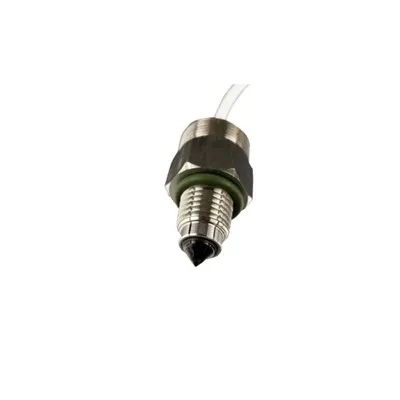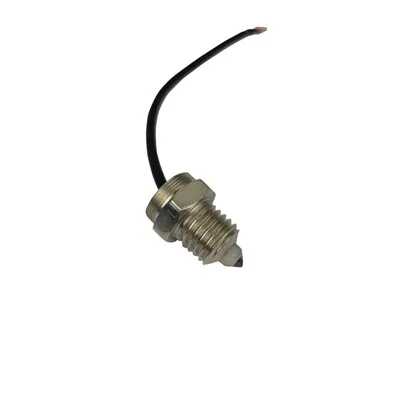
Capacitive sensors technology overview
Capacitive sensors are everywhere: in smartphones, industrial control panels, wearables, appliances, vehicles, medical devices, kiosks, and smart home products. Their popularity comes from a simple advantage: they can detect human touch, proximity, position, liquid level, or material presence without relying on mechanical movement.
At the center of capacitive sensors technology is the ability to measure changes in capacitance. When a finger, conductive object, or dielectric material enters the sensor's electric field, the measured capacitance changes. Electronics interpret that change and convert it into an action, such as tapping a button, swiping on a screen, detecting an object, or confirming that a container is full.
This guide explains how capacitive sensors work, where they are used, the difference between common sensor types, and what engineers and product teams should consider when evaluating capacitive touch technology.
What Is a Capacitive Sensor?
A capacitive sensor is an electronic device that detects a change in capacitance between conductive elements. Capacitance is the ability of a system to store electrical charge. In a basic sense, two conductive surfaces separated by an insulating material form a capacitor.
In a sensor, one conductive element is typically an electrode. The surrounding environment, nearby objects, or a user's finger act as the second part of the capacitive system. When something approaches or touches the sensing area, the electrical field changes. The sensor circuit measures this change and uses it to determine whether an interaction has occurred.
Capacitive sensors can detect:
Direct touch from a finger
Near-touch or proximity
Position and movement
Presence or absence of objects
Changes in material level, such as liquids or powders
Gestures, sliders, wheels, and multi-touch inputs
Because there are no moving mechanical contacts, capacitive sensors can be durable, sealed, and easy to clean. This makes them especially useful in products that need a modern interface, long service life, or resistance to dust and moisture.
How Capacitive Sensors Technology Works
The core principle behind capacitive sensors technology is the measurement of small electrical changes. A sensing electrode is charged and discharged by a control circuit. The circuit monitors how quickly the voltage changes, how much charge is stored, or how the electric field behaves.
When a conductive object such as a human finger comes near the electrode, it adds capacitance to the system. The controller detects that increase and compares it with a threshold. If the change is large enough and matches the expected pattern, the device registers a touch or proximity event.
In many designs, the sensor sits behind a non-conductive overlay such as glass, plastic, acrylic, or ceramic. The electrode does not need to be exposed. This is one reason capacitive interfaces are common in consumer electronics and industrial panels: the front surface can be smooth, sealed, and visually clean.
A typical capacitive sensing system includes:
A conductive sensing electrode
A non-conductive overlay or surface material
A capacitive sensing controller or microcontroller
Signal processing firmware
Grounding and shielding structures
Calibration logic to account for environmental changes
The quality of the final user experience depends on more than the sensor itself. Electrode design, overlay thickness, grounding, firmware filtering, moisture handling, and electrical noise immunity all affect performance.
Types of Capacitive Sensors
Capacitive sensors are often grouped by the way they measure capacitance and the type of interaction they support. The right choice depends on the application, environment, and required accuracy.
Self-Capacitance Sensors
Self-capacitance sensors measure the capacitance between a single electrode and ground. When a finger approaches the electrode, the capacitance increases.
These sensors are commonly used for:
Touch buttons
Simple sliders
Proximity detection
Appliance controls
Basic human-machine interfaces
Self-capacitance designs are relatively simple and sensitive, making them a strong choice for single-touch or limited-input applications. However, they can be less suitable for complex multi-touch detection because multiple simultaneous touches may be harder to distinguish accurately.
Mutual-Capacitance Sensors
Mutual-capacitance sensors use a grid of transmit and receive electrodes. The controller measures the capacitance between intersecting electrode lines. When a finger touches the surface, it changes the electric field at a specific locati0n in the grid.
This approach is widely used in capacitive touchscreens because it enables accurate position detection and multi-touch functionality. It allows a device to recognize gestures such as pinch, zoom, rotate, swipe, and multi-finger taps.
Mutual-capacitance sensing is typically more complex than self-capacitance sensing, but it provides the precision and scalability required for modern displays and interactive surfaces.
Projected Capacitive Sensors
Projected capacitive sensing, often called PCAP or P-CAP, is the technology behind many modern touch displays. It projects an electrostatic field through a protective surface, such as glass. The user does not need to press hard; a light touch is usually enough.
Projected capacitive sensors are common in:
Smartphones and tablets
Automotive infotainment screens
Retail kiosks
Industrial touch panels
Medical displays
Public information terminals
PCAP technology supports sleek designs, high optical clarity, and multi-touch input, which is why it has become a standard for premium touch interfaces.
Capacitive Touchscreens Explained
Capacitive touchscreens are one of the most familiar uses of capacitive sensing. Unlike older resistive touchscreens that respond to pressure, capacitive touchscreens respond to changes in the electric field caused by a conductive input, usually a finger.
This creates a more responsive and intuitive experience. Users can tap, swipe, drag, and use multi-finger gestures with little physical force. The screen can also be covered with durable glass, improving scratch resistance and visual quality.
Key benefits of capacitive touchscreens include:
Fast response to light touch
Support for multi-touch gestures
High display clarity
Smooth glass surface
Long operating life with no mechanical switch wear
Modern look and feel
However, capacitive touchscreens also require careful design. Gloves, water droplets, electrical noise, and thick overlays can affect performance unless the system is engineered to handle those conditions.
Capacitive Touch Technology vs. Resistive Touch Technology
Capacitive and resistive touch systems are often compared because both are used for touch input. The main difference is how they detect interaction.
Resistive touch technology relies on physical pressure. Two conductive layers come into contact when pressed, allowing the system to identify the touch locati0n. This means it can work with a finger, stylus, glove, or almost any object that applies pressure.
Capacitive touch technology, by contrast, detects changes in an electric field. It generally offers better responsiveness, multi-touch capability, and optical clarity, but it usually requires a conductive input or specialized glove support.
Capacitive technology is often preferred when user experience, design aesthetics, and gesture support matter. Resistive technology may still be used where low cost, pressure activation, or input flexibility is more important.
Common Applications of Capacitive Sensors
Capacitive sensors are versatile because they can be adapted for touch, proximity, level sensing, and object detection. Their uses extend far beyond screens.
Consumer Electronics
Smartphones, tablets, laptops, earbuds, remote controls, and gaming devices use capacitive sensing for touchscreens, buttons, sliders, trackpads, and gesture controls. The technology supports compact designs and premium-feeling interfaces.
Appliances and Smart Home Devices
Ovens, washing machines, thermostats, lighting controls, coffee machines, and security panels often use capacitive buttons behind glass or plastic. These interfaces are easy to wipe clean and can be integrated into stylish product surfaces.
Industrial Controls
Industrial systems use capacitive touch panels and proximity sensors in control cabinets, machine interfaces, and sealed operator panels. When designed correctly, capacitive controls can withstand dust, moisture, vibration, and frequent cleaning.
Automotive Systems
Vehicles increasingly use capacitive touch technology in infotainment displays, steering wheel controls, climate panels, door handles, and proximity-based features. Automotive applications require robust noise immunity and reliable performance across temperature changes.
Medical and Healthcare Devices
Medical products benefit from sealed surfaces that are easier to disinfect. Capacitive sensors can support touch interfaces on diagnostic equipment, monitoring devices, and control panels where hygiene and reliability are important.
Level and Presence Detection
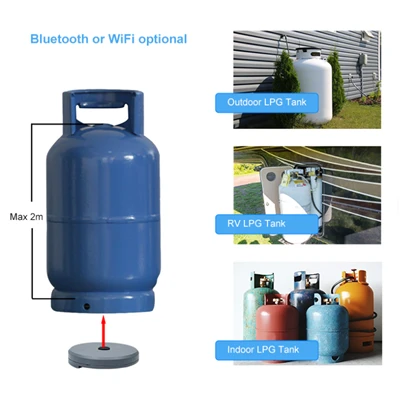
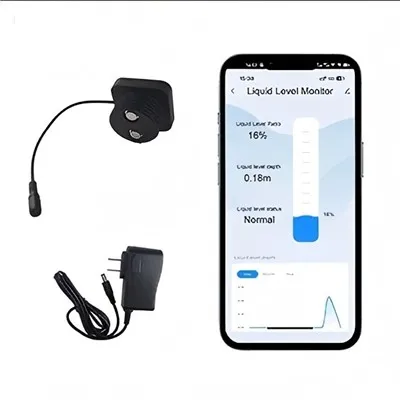
Capacitive sensors can detect materials without direct contact. They are used to sense liquids, powders, granules, and solid objects through container walls. This makes them useful in packaging, agriculture, manufacturing, and process control.
Advantages of Capacitive Sensors
Capacitive sensors are popular because they combine reliability, flexibility, and design freedom. Their main advantages include:
No mechanical wear: Since there are no moving parts, the interface can last longer than traditional buttons.
Sealed construction: Sensors can sit behind glass or plastic, helping protect electronics from dust, moisture, and contaminants.
Modern design: Smooth, uninterrupted surfaces support clean product aesthetics.
High sensitivity: Sensors can detect light touch or proximity without force.
Multi-touch capability: Advanced designs support gestures and complex inputs.
Easy cleaning: Flat surfaces are easier to sanitize and maintain.
Flexible form factors: Electrodes can be shaped for buttons, wheels, sliders, or custom layouts.
These benefits make capacitive sensing a strong choice for products where user experience and durability are both priorities.
Limitations and Design Challenges
Although capacitive sensors are powerful, they are not always plug-and-play. Several design factors can affect performance.
Common challenges include:
Moisture sensitivity: Water can alter the electric field and cause false touches if not properly managed.
Glove operation: Standard gloves may reduce conductivity, requiring higher sensitivity or glove-compatible tuning.
Electrical noise: Motors, power supplies, displays, and wireless signals can interfere with sensing.
Overlay thickness: Thick glass or plastic can reduce sensitivity.
Grounding issues: Poor grounding can lead to unstable readings.
Environmental drift: Temperature and humidity changes can shift baseline capacitance.
Unintentional activation: Proximity sensitivity can cause false triggers if thresholds are poorly tuned.
Good design practices help reduce these issues. This may include shielding, guard traces, firmware filtering, waterproof algorithms, proper mechanical stack-up, and controlled electrode geometry.
Best Practices for Capacitive Sensor Design
A reliable capacitive sensing product starts with system-level planning. The sensor, electronics, enclosure, firmware, and user environment should be considered together.
Important best practices include:
Define the use case clearly
Determine whether the sensor must detect touch, proximity, gestures, liquid level, or object presence. Each use case has different requirements.
Choose the right sensing method
Use self-capacitance for simpler buttons and proximity functions. Use mutual-capacitance or projected capacitive designs for touchscreens and multi-touch input.
Optimize electrode geometry
Electrode size, spacing, shape, and routing affect sensitivity and noise performance. Avoid treating electrode layout as an afterthought.
Control overlay materials
Glass, plastic, paint, adhesives, and air gaps can all influence sensing. Keep the mechanical stack consistent and predictable.
Plan for real-world conditions
Consider moisture, gloves, dirt, temperature variation, electrostatic discharge, and electromagnetic interference early in the design process.
Use calibration and filtering
Baseline tracking, debounce logic, and signal filtering help separate real touches from noise or environmental drift.
Test with actual users
A sensor that works in a lab may feel too sensitive, too slow, or inconsistent in real use. Prototype testing is essential.
The Future of Capacitive Touch Technology
Capacitive touch technology continues to evolve as products become more connected, compact, and interface-driven. Future development is likely to focus on better operation in wet conditions, improved glove support, lower power consumption, flexible surfaces, and more advanced gesture recognition.
As touch interfaces expand into vehicles, medical devices, wearables, appliances, and industrial equipment, capacitive sensing will remain a core technology for creating intuitive human-machine interaction. The combination of durability, responsiveness, and design flexibility makes it one of the most important sensing methods in modern electronics.
Final Thoughts
Capacitive sensors transform subtle electrical changes into useful input. From simple touch buttons to advanced capacitive touchscreens, the technology enables responsive, sealed, and modern interfaces across many industries.
Understanding the basics of capacitive sensors technology helps product teams make better decisions about sensor type, materials, layout, and performance requirements. When designed carefully, capacitive touch technology can deliver a user experience that feels effortless while supporting the durability and flexibility modern products demand.